
Contact Form Not Working? Why Forms Fail Silently — and How to Test Yours
Most broken contact forms fail silently: the visitor sees "message sent," but nothing arrives. The usual causes are unauthenticated email landing in spam, a misconfigured recipient, a plugin or theme update, or — on AI-built sites — backend wiring that only worked in the builder. The only reliable test: submit the form as a stranger and verify it arrives.
A broken contact form is the worst bug a business website can have, and it's not close. A broken layout looks bad; a broken form costs you every single person who tried to reach you and assumed you didn't answer. And unlike almost any other failure, it generates no complaint — the visitor believes their message went through, and you believe nobody wrote. Both sides think everything is fine.
I've spent nine years testing software, and forms are where I've seen the most real-world damage per bug. Here's how they fail, why yours passed when you tested it, and the five-minute protocol that actually proves a form works.
How would I even know my contact form is broken?
That's the trap: you usually wouldn't. A broken form doesn't throw an error you'll see, doesn't appear in analytics as anything but a normal page visit, and doesn't stop the site from looking perfect. The only externally visible symptom is an absence — fewer enquiries than usual — which is indistinguishable from a slow month.
In audits, the tell is duration: when we find a dead form, it has typically been dead for weeks, sometimes months — usually since a specific update or change nobody connected to it. If your enquiries dipped and you "can't remember the last time the form was tested," treat the form as guilty until proven innocent.
The five ways contact forms fail
1. The email is never sent at all
The form submits, the backend tries to hand the message to an email system, and that handoff fails: the site's mail function is disabled by the host, an API key for the email service expired, or the sending step errors in a log nobody reads. The visitor still sees a success message, because the frontend's job ended when the request fired. Nothing was ever addressed to you, so there's nothing to find in spam either.
2. The email sends — straight into spam
Web servers sending mail directly, without SPF/DKIM/DMARC authentication on the domain, look exactly like spammers to receiving servers — so their messages get filtered or rejected outright. This one is sneaky because it can work for months and then stop when a mail provider tightens its rules, with zero changes on your site. If your form notifications come "from" your own domain but aren't authenticated, assume some of them are already being eaten.
3. The success message is lying
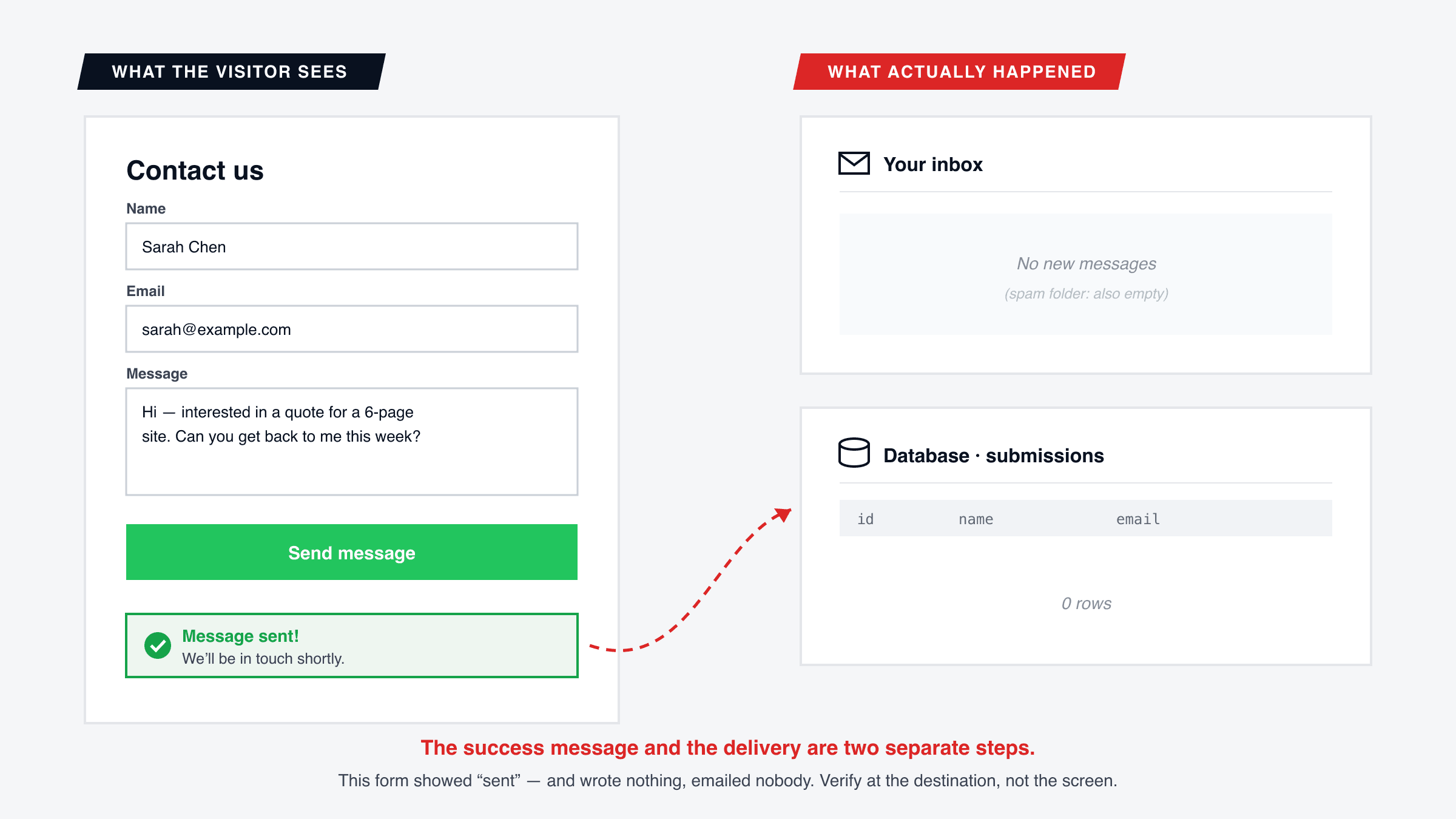
Common on AI-built sites, and #1 in our list of bugs almost every vibe-coded site ships with: the AI generates a beautiful form, a convincing "Thanks, we'll be in touch!" state — and no working connection between them. The success state renders whether or not anything was saved or sent, because it was built as UI, not as confirmation. The database write fails on visitor permissions, or the endpoint doesn't exist in production, and the form congratulates the visitor anyway.
4. The form can't actually be completed on a phone
A required checkbox rendered half off-screen at 375px. A date picker that doesn't open in iOS Safari. A dropdown whose options overflow the viewport. A submit button pushed below an on-screen keyboard with no way to scroll to it. The form is technically functional and practically unusable — for the majority of your visitors, who are on phones. (If your site has other problems at phone width, they travel together — see why sites look fine on desktop but break on mobile.)
5. It worked — until an update broke it
Forms sit at the intersection of the most moving parts: theme, form plugin, mail plugin, host configuration, third-party service. Any of them updating can break the chain. This is the classic WordPress failure — a plugin update changes how mail is sent, and enquiries stop with no visible change anywhere on the site. It's why "we redesigned / updated / migrated recently" and "enquiries feel slow lately" so often appear in the same sentence.
Why did the form work when I tested it?
Because you didn't test the form — you tested the form as you. On your own machine, often logged into your own site or builder, in an environment configured around your account. That version of the form has permissions, sessions, and configuration a real visitor doesn't have.
The starkest version is AI builders. In Lovable or Bolt, the preview runs inside your authenticated workspace: database writes succeed because youare allowed to write. Publish the site, and a visitor's submission hits the same database as an anonymous stranger — and if permissions only allow the owner, it fails. Same form, same code, different person. This is also why the fix for a vibe-coded form is usually one prompt away ("allow anonymous visitors to submit the contact form") — once you know it's broken.
The rule that follows: a form test only counts if it's done as a stranger, on the live site, verified at the destination.
How to test a contact form properly — the 5-minute protocol
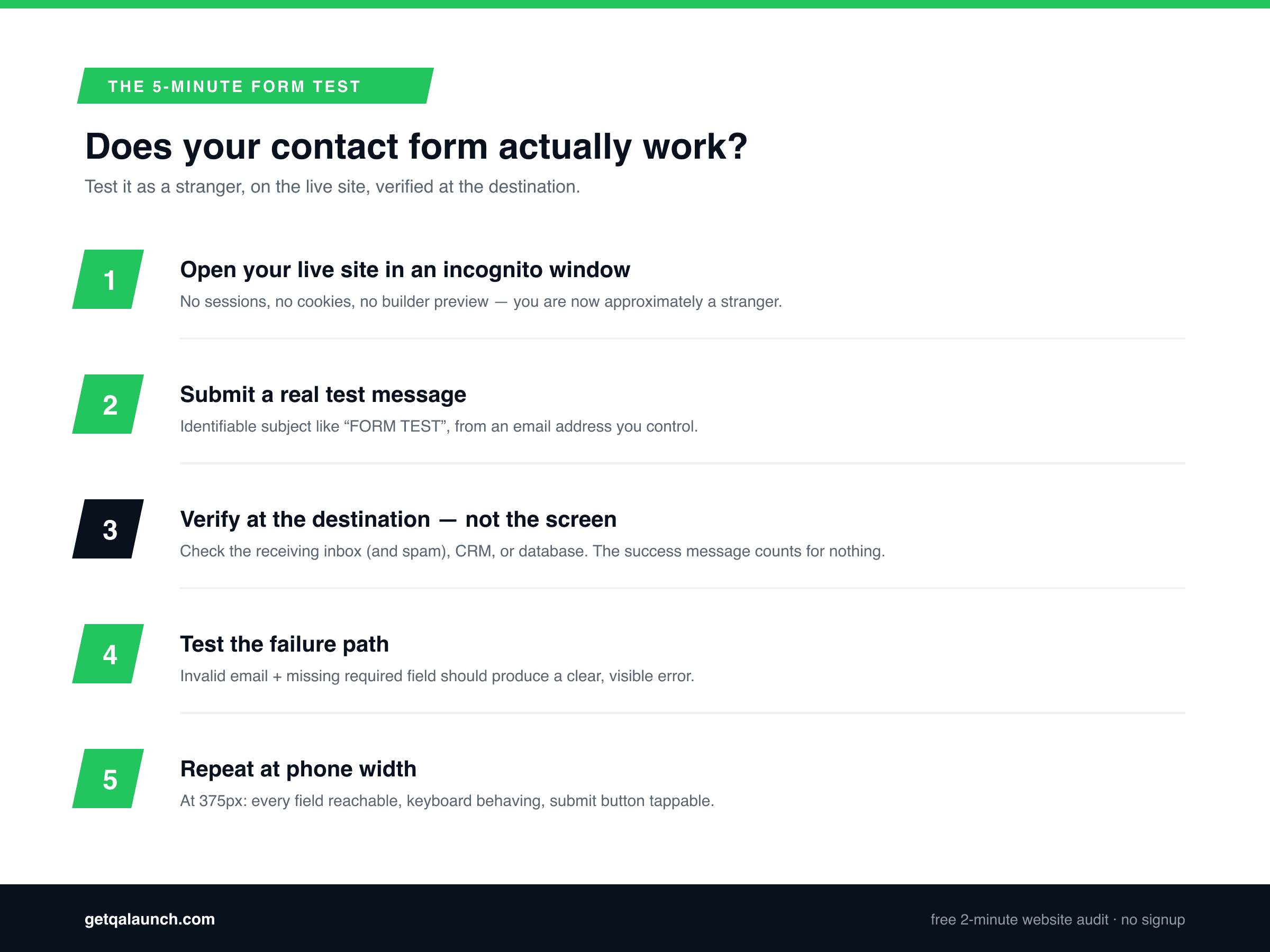
- Open your live site in an incognito window.Not the builder, not the preview, not while logged in. Incognito strips your sessions and cookies — you're now approximately a stranger.
- Submit a real test messagewith an identifiable subject like "FORM TEST July 7" from an email address you control.
- Verify at the destination, not the screen. The success message counts for nothing. Check the inbox the form should deliver to — and the spam folder. If submissions go to a database or CRM, look there. Give it five minutes.
- Test the failure path too. Submit with an invalid email and a missing required field. You should get a clear, visible error — a form that accepts garbage silently has the same disease as one that drops messages.
- Repeat at phone width. Fill and submit the same form at 375px (Chrome DevTools device mode, or your actual phone). Every field reachable, keyboard behaving, submit button tappable.
Then put a monthly reminder in your calendar and re-run steps 1–3. Not because your site will change — because the email side can break without your site changing at all.
Platform notes: WordPress, Shopify, and AI builders
WordPress:most form failures are mail-delivery failures. If the form plugin says "sent" and nothing arrives, the fix is almost always routing mail through an authenticated SMTP service instead of the server default, via a plugin like WP Mail SMTP. Form and mail plugins should be on your shortlist of things to re-test after every update — this is one specific case of the pattern covered in why WordPress sites break after every update, plus more in our WordPress site check guide.
Shopify:the built-in contact form is reliable at sending — to the store's configured sender email, which after years of admin changes isn't always an inbox anyone reads. Verify where it actually delivers. Custom-theme forms and app-injected forms need the full protocol above; if the bigger issue on your store is mobile checkout rather than the contact form, see why Shopify stores lose mobile customers at checkout, or our Shopify store audit guide for the other conversion killers that tend to accompany them.
Lovable / Bolt / Replit / v0: assume the form is broken until the incognito test passes. The builder preview cannot tell you — it runs as you. Check that environment variables exist in production and that anonymous visitors are permitted to write the submission. One test as a stranger settles it.
Frequently asked questions
How do I test if my contact form is actually working?
Open your live site in an incognito window, submit the form with a real message from an email address you control, then verify the message arrived at its destination — your inbox, your CRM, or your database. Not the success message on screen: the actual destination. If it isn’t there within a few minutes (check spam too), your form is broken.
Why does my form show "message sent" but I never receive anything?
Because the success message and the delivery are two separate steps, and most forms show the first regardless of the second. The frontend confirms it fired the request; whether an email was generated, accepted, and delivered is decided later, by systems the success message never hears back from. That gap is exactly where forms fail silently.
Why are my contact form emails going to spam?
Usually because the email is sent from your web server without authentication — no SPF, DKIM, or DMARC records proving the message legitimately comes from your domain. Receiving servers treat unauthenticated mail with suspicion. Fixes: send through an authenticated SMTP or transactional email service instead of the server’s default mail function, and verify your domain’s DNS records.
How often should I test my website’s forms?
After every change to your site — theme updates, plugin updates, new sections, replatforming — and on a monthly schedule even when nothing changed, because the failure can be on the email side rather than your site. The test takes five minutes. Weeks of silently lost enquiries cost considerably more.
My Lovable / Bolt site’s form worked in the preview but not on the live site. Why?
The builder preview runs with your session, your permissions, and the builder’s environment. The live site runs with a visitor’s permissions and production configuration. If an environment variable didn’t make it to production, or your database only permits writes from the account you built with, the form works for exactly one person: you.
Can a tool test my contact form automatically?
Partly. QAlaunch opens your live site in a real browser as an anonymous visitor and checks that forms render, accept input, validate sensibly, and respond on submission — which catches broken buttons, dead endpoints, and mobile-unusable fields. End-to-end delivery into your specific inbox still needs the one-time manual test described above, because only you can see your inbox.
Find out if your form is quietly costing you enquiries
QAlaunch opens your live site in a real cloud browser as an anonymous visitor — the stranger test, automated — and checks your forms, buttons, links, and mobile rendering along with 30+ other things owners can't see from the inside. Free scan, about two minutes, no signup.
More from the audit trenches: the nine bugs AI-built sites ship with and why your site looks fine on desktop but breaks on mobile.