
How to Test a Base44 App Before Launch — a QA Engineer's Checklist
Test a Base44 app on its published URL, never in the editor: open your base44.app link in an incognito window, walk every public page at phone width, sign up as a brand-new user, and verify forms and data boundaries as a stranger. The editor preview runs logged-in, on desktop, with test data — exactly the conditions that hide launch-day bugs.
Base44 is the most complete of the vibe-coding builders: prompt by prompt it gives you a frontend, a backend, a database, authentication, and hosting — a genuinely full-stack app with nothing else to wire up. That completeness is also exactly why testing it matters more, not less. A Lovable landing page can break in a handful of ways. A Base44 app has sign-up flows, user data, and permissions — real ways to fail that a marketing site simply doesn't have.
After auditing a lot of AI-built apps, the pattern is boringly consistent: the app is finished, the builder preview looks perfect, the owner shares the link — and the first real visitor hits something the owner has never seen. Here's what breaks, why you never saw it, and the 25-minute test that catches it first.
Why your Base44 app works for you and breaks for everyone else
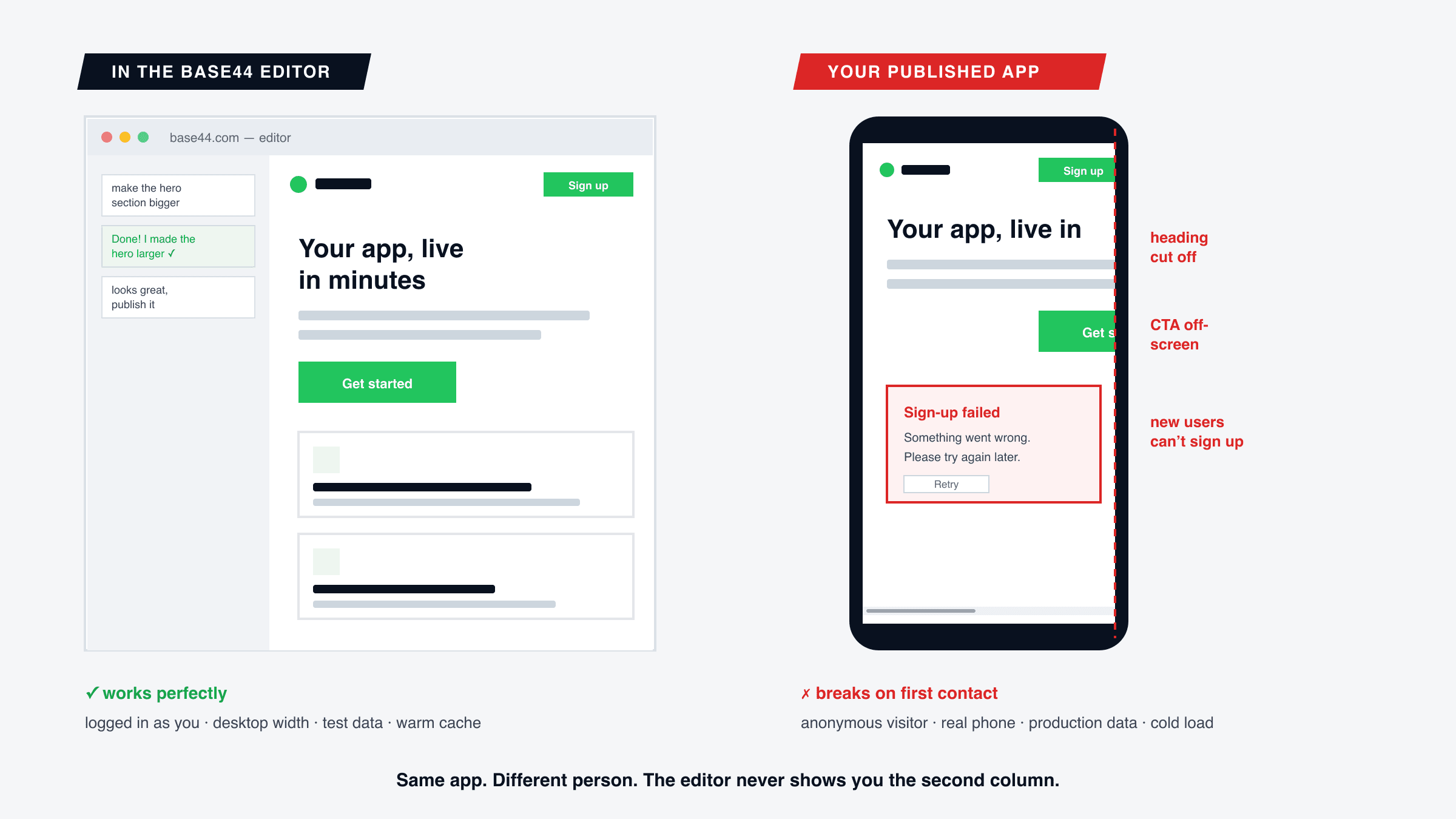
Everything you know about your app, you learned inside the Base44 editor. And the editor shows you your app under the best conditions it will ever have: you are logged in as the owner, the preview pane is desktop-width, the data is often test data, and the cache is warm from your last change. Every "looks great, publish it" decision was made there.
Your first real user gets the opposite of all four: an anonymous session with a visitor's permissions, a 375px phone screen, production data, and a cold load. Bugs that live in that gap — a sign-up that fails for anyone who isn't you, a hero that overflows a phone screen, a record that saves in test mode but not in production — are not rare edge cases. They are the default failure mode of anything built and approved inside a builder preview. It's the same workflow problem behind the nine bugs almost every AI-built site ships with— Base44 just adds a database and auth to the blast radius.
The bugs we see most in Base44 apps
1. Sign-up that only works for the owner
The highest-stakes bug, because it turns away 100% of new users at the door. In the editor you were never not signed in, so the new-user path — the form, the confirmation email, the redirect back into the app — was never exercised end to end. Confirmation links pointing at the wrong domain and redirects that assume an existing session are the usual suspects. One incognito sign-up with a fresh email address settles it.
2. Users who can see each other's data — or nothing at all
Base44 generates your data model and permissions from prompts, and permission logic is precisely the kind of thing that looks fine until a seconduser shows up. The two failure directions are equally common: user B sees user A's records, or user B sees an empty app because records were scoped to the owner. You cannot detect either with one account. Two accounts, two browsers, five minutes.
3. The blank screen after an update
A widely reported Base44 gotcha: after you push changes, returning visitors with a stale cache get a blank page. You fix it for yourself with a hard refresh without thinking — but a visitor who lands on white nothingness doesn't troubleshoot, they leave. After every meaningful update, load the published app once in a fresh incognito window before you consider the update done.
4. Integrations that look connected but aren't
Payments, email, Slack notifications, file uploads — in a Base44 app these run through integrations that can appear configured while the live calls quietly fail: webhooks that never arrive, emails that never send, uploads that error only for non-owners. The rule is the same one we push in why contact forms fail silently: a success message on screen proves nothing. Verify at the destination — the inbox, the Stripe dashboard, the database row.
5. A landing page that falls apart at 375px
The classic builder-preview casualty, and Base44 apps are not exempt: heroes that overflow a phone viewport, CTAs pushed off-screen, text that becomes unreadable at mobile breakpoints. Your app's public pages are where every visitor decides whether to sign up at all, and they were reviewed at desktop width only. The mechanics — and the 15-minute check — are covered in why your site looks fine on desktop but broken on mobile.
The 25-minute pre-launch test, in order
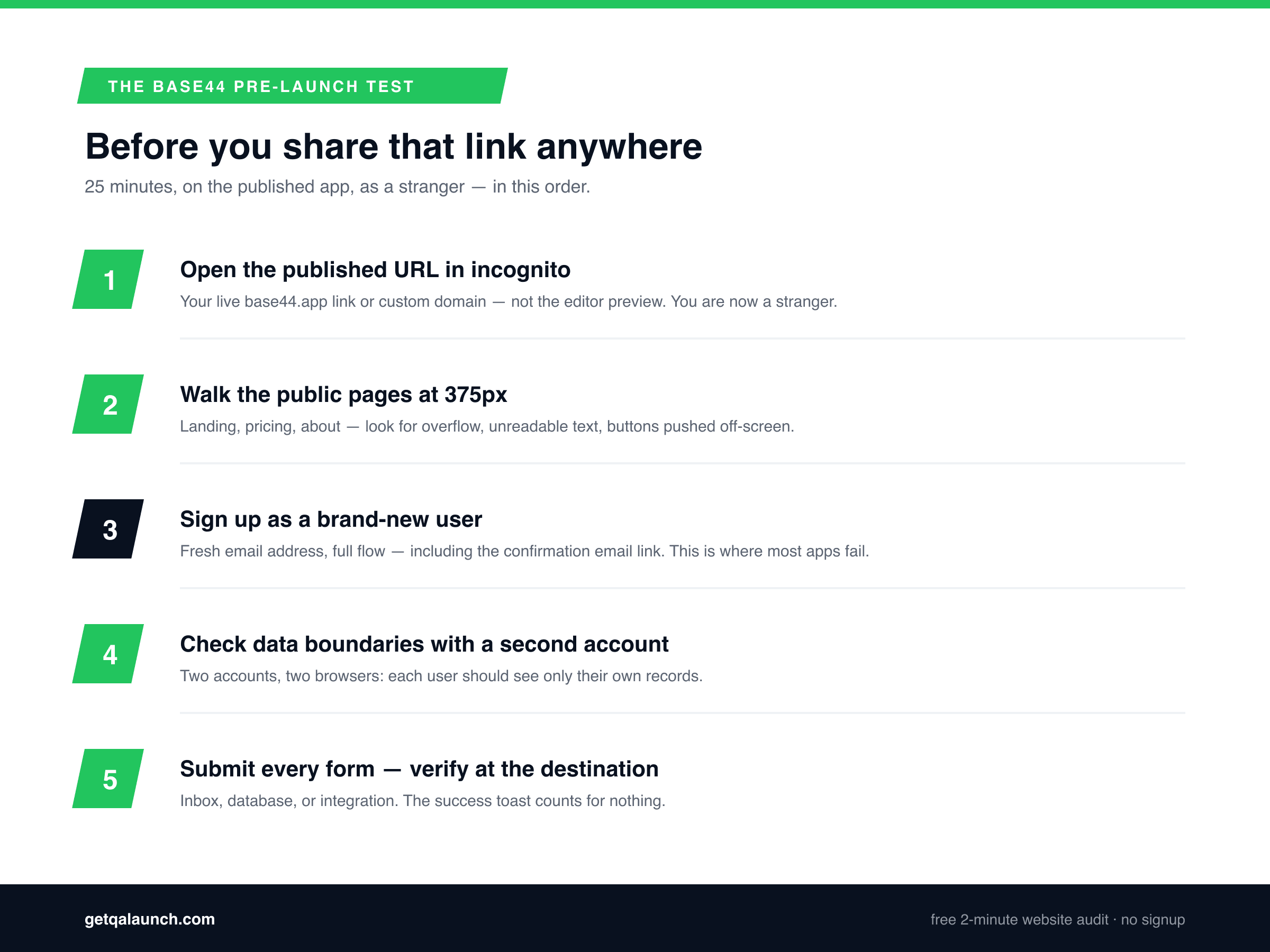
Run this on the published app — your base44.app URL or custom domain — not the editor preview. The order matters: each step assumes the one before it passed.
- Open the published URL in an incognito window.No session, no cache, no owner permissions. If you see a blank screen or an error before doing anything at all, you've already found launch-blocker number one.
- Walk the public pages at 375px.Chrome DevTools device mode (Cmd/Ctrl+Shift+M), width 375. Landing, pricing, about — look for horizontal overflow, unreadable text, buttons you can't reach or tap.
- Sign up as a brand-new user.A fresh email address you've never used with the app, the complete flow, including clicking the confirmation email link and landing back inside the app. This single step catches the worst bug on the list.
- Exercise the core flow, then repeat with a second account. Create a record, upload a file, do whatever your app is for. Then do it again as a second user in a different browser and confirm each account sees only its own data.
- Submit every form and verify at the destination. Contact forms, checkout, notification triggers — check the inbox, the dashboard, or the database. Never the toast.
- Re-check after every significant update. Steps 1–2 take five minutes and catch the cache-blank-screen and layout regressions that Base44 updates most often introduce.
Base44's built-in test data toggle is worth using during development — it lets you try changes without touching production records. Just be clear about what it is: a tool for testing your app as you. Nothing in it answers the only launch question that matters, which is what happens to a stranger.
What about the parts behind the login?
An honest boundary: automated site audits — QAlaunch included — test what a visitor can reach without an account. For a Base44 app that means your landing page, pricing, about, and the sign-up screen itself: the pages that decide whether anyone becomes a user in the first place, and where the mobile and first-impression bugs live. The authenticated inside of your app — data boundaries, the core flow — is what steps 3–5 above are for, and they're manual because they genuinely require two accounts and your own inbox.
Security is its own third lane: server-side validation, exposed keys, and auth hardening are a code-level review, not a visitor-experience audit. If your app handles anything sensitive, do both — they find entirely different problems.
Frequently asked questions
How do I test my Base44 app before launching it?
Open the published URL (your base44.app link or custom domain) in an incognito window — not the editor preview. Walk every public page at 375px width, sign up as a brand-new user with a fresh email, check that two different accounts can’t see each other’s data, and submit every form, verifying the result at its destination rather than trusting the success message.
Why does my Base44 app work in the editor but break when published?
The editor preview runs under the best possible conditions: you’re logged in, on a desktop-width pane, often against test data, with a warm cache. The published app runs for an anonymous stranger, on a phone, against production data and permissions. Bugs that live in that gap — sign-up failures, permission errors, mobile layout breaks — are invisible in the editor by definition.
Why is my Base44 app showing a blank screen?
The most commonly reported cause is stale browser cache after an update — a hard refresh (Cmd+Shift+R or Ctrl+Shift+R) clears it for you, but your visitors won’t know to do that, so re-test the published app in a fresh incognito window after every significant change. Persistent blank screens are worth re-prompting over, because a visitor who hits one simply leaves.
Does QAlaunch work on Base44 apps?
Yes — on every publicly accessible page: your landing page, pricing, about, and the sign-up screen itself, on a base44.app subdomain or a custom domain. QAlaunch opens the published app in a real cloud browser at desktop and phone widths and flags broken links, invisible buttons, mobile layout problems, and missing SEO basics. Pages behind a login still need the manual checks in this article.
Do I still need to test if Base44 has a test data toggle?
Yes. The test data toggle is genuinely useful — it lets you exercise your app without polluting production records — but it tests your app as you. It can’t tell you whether a brand-new visitor can sign up, whether your landing page survives a 375px screen, or whether two users’ data stays separated. Those only show up when you test as a stranger.
Is Base44 buggier than Lovable or Bolt?
Not especially — the failure pattern is the same across every AI builder, because it comes from the workflow, not the tool. Anything built and approved inside a builder preview ships with bugs the preview physically can’t show. Base44’s full-stack nature just raises the stakes: there’s auth, a database, and permissions to get wrong, not only a layout.
Check your Base44 app's public pages right now
Paste your published base44.app URL or custom domain into QAlaunch for Base44 and a real cloud browser opens your live app at desktop and phone widths, runs 35+ automated checks plus an AI visual review, and hands you your top issues in about two minutes. Free, no signup — the fastest way to see what a stranger sees.
Building with other AI tools too? See the guides for testing Lovable sites and testing Bolt.new sites.